


MAPS.ME: Offline maps GPS Nav
4.113.66K Reviews
App Specs
- Version
- v17.12.72038-googleRelease
- Updated On
- License
- Free
- Downloads
- 50,000,000+
- Developer
- Maps_Me
- Categories
- Travel & Local
- Platform
- Android
Screenshots
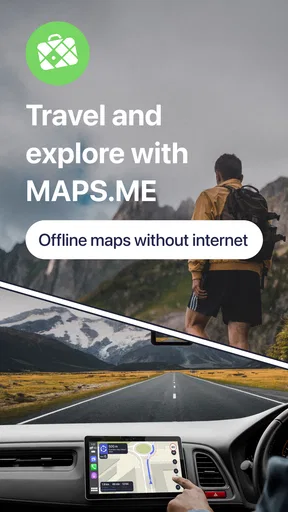
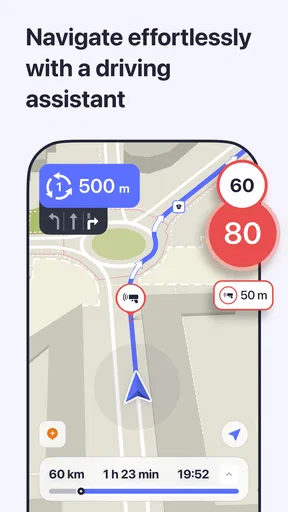
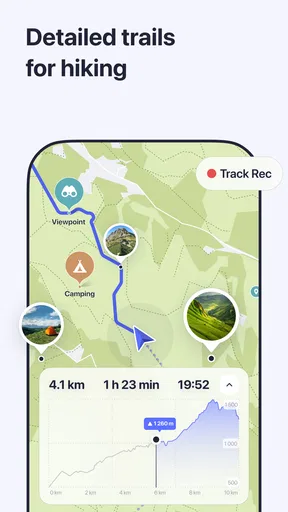

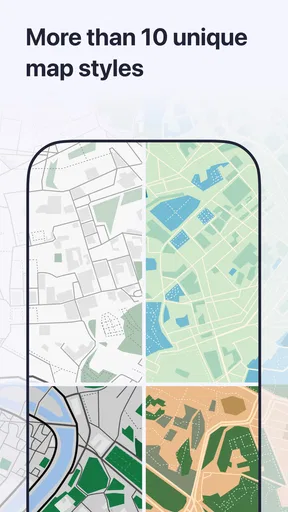


 Analysis by AppCompare
When it comes to traveling or just navigating your own city, having a reliable map app on your phone can be a game-changer. Recently, I decided to give MAPS.ME: Offline maps GPS Nav a whirl, and I've got to say, it's quite a nifty little tool.
Where offline navigation makes the biggest difference
The feature I value most is not simply that a map can be saved, but that I can plan around a likely loss of signal. Before leaving a hotel or home, I can find the area I expect to visit, save the relevant map, and check that the places I care about appear on it. That small routine makes the app much more useful than waiting until a rural road or unfamiliar neighborhood has already left me without mobile data.
This is particularly handy for a trip with several stops: I can bookmark the hotel, a station, and a restaurant before heading out, then use those saved places as practical anchors instead of trying to remember street names. I would still keep an address or a second navigation option for an important appointment, but for ordinary exploration, offline access takes a lot of pressure off.
It is also worth thinking about storage before downloading maps for a long journey. Larger areas take more room on a phone, so I would choose the countries or regions I actually expect to use rather than collecting maps “just in case.” If a route crosses a border, I would check both sides in advance. The useful habit is to prepare the map while connected, not to assume that every new area will already be available offline.
A practical fit for travelers, walkers, and drivers
I would recommend this app most readily to people who travel beyond dependable mobile coverage, want to keep data use down, or prefer having a map ready before they set off. It can also suit a visitor who likes wandering on foot: saving a few points of interest beforehand creates a loose itinerary without locking the day into a strict schedule. For cycling, it offers another way to explore, although I would still judge a suggested route against the conditions and roads I can see around me.
For a realistic everyday example, imagine arriving in a new city, connecting to Wi-Fi at your accommodation, and saving the area around the station and the places you plan to visit. Later, while walking between a museum and a café, you can refer to the downloaded map instead of depending on a live connection. If plans change, bookmarks make it easier to find the next saved stop. I find this workflow more dependable than improvising all the preparation after leaving the hotel.
Drivers can benefit too, especially on a road trip through areas where reception may be inconsistent. Still, I would not treat any navigation app as a substitute for paying attention to road signs, temporary closures, or local driving rules. For a complicated city commute where current traffic conditions are the deciding factor, a live-navigation service may be the better companion. The sensible choice depends on whether the main problem is getting live updates or having directions when the network drops.
Worth Reading Before You Choose

Flipboard Shows What News Apps Must Do Beyond the Feed

Switching to Android Auto Means Rethinking Your Driving Routine

Google Calendar Makes a Crowded Week Easier to Manage

Ludo King Makes the Most of the Minutes Between Plans

Baby Panda World Brings Quick Play to Modern Phones, but Its Game Library Feels Busy

ESPN’s Live Game View Makes Following Close Games Easier
How it compares with familiar map apps
Compared with the map app many people already use for daily errands, MAPS.ME’s clearest distinction is the offline-first use case. A mainstream alternative may be more convenient when I need current traffic, live place details, or seamless services I already rely on. MAPS.ME makes more sense when I want to prepare an area in advance and keep navigating without assuming a reliable data connection. I would not insist that one replace the other; keeping both available can be a more practical travel setup.
That trade-off matters for discovery as well. A map can show restaurants, hotels, and attractions, but a point of interest is a starting point rather than a guarantee that a place is open, still operating, or right for my needs. I would check time-sensitive details separately before making a special trip. For a casual walk, a saved marker is enough; for a reservation or a tight schedule, I would verify the destination before setting off.
What to prepare before relying on it
My most useful tip is to test the actual workflow at home: download an area, switch off mobile data, and see whether the map and route you need are available. That quick check can reveal a missed region before it becomes an inconvenience. I would also save destinations with recognizable names rather than relying on memory, and keep a note of a street address for places where finding the exact entrance matters.
Offline maps are not the same as a live picture of everything happening on the road. When a route depends on a newly changed street layout, current congestion, or a last-minute detour, I would cross-check with signs or another source that can provide current information. For a low-stakes walk or a familiar drive through a weak-signal area, the offline advantage is much more valuable than live updates.
There is also a difference between using an app occasionally and keeping it ready for every trip. A traveler who wants one dependable backup may appreciate preparing a few maps and bookmarks. Someone who expects up-to-the-minute traffic, extensive live local information, or a single app tightly tied to other daily services may find their usual map more convenient. I see MAPS.ME as a useful specialist rather than a universal winner.
First Impressions and User Interface
At first glance, MAPS.ME doesn’t scream flashy, but that’s part of its charm. The interface is clean, straightforward, and user-friendly. It’s the kind of app that makes you feel like you’ve been using it for years, even if you’ve just downloaded it. The map loads quickly and smoothly, and there are no unnecessary bells and whistles to distract you from what you’re really there to do: find your way.
Features That Stand Out
One of the coolest things about MAPS.ME is its offline capabilities. You can download entire maps of countries or regions, which means you can navigate even when you’re in the middle of nowhere with no data connection. This feature is a lifesaver if you’re traveling abroad and trying to avoid those pesky roaming charges.
Navigation is another area where this app shines. The turn-by-turn directions are clear and accurate, and there’s even a voice guidance option if you prefer to keep your eyes on the road. The app also provides walking and cycling directions, which is perfect for exploring new cities without relying solely on public transport.
Exploring the World with Confidence
Beyond just getting from A to B, MAPS.ME offers detailed points of interest. From restaurants and cafes to tourist attractions and hotels, you’ll find plenty of options to explore. What’s more, the information is crowd-sourced, so it’s constantly being updated by users around the globe. This makes it a dynamic and ever-evolving resource.
Another aspect I appreciated was the app’s ability to bookmark locations. Whether you’ve found a charming little bookshop or the best pizza place in town, you can save these spots for easy reference later. It makes planning your day out a breeze.
Personal Experience and Ease of Use
Using MAPS.ME on a recent road trip felt like having a trusty navigator by my side. I didn’t have to worry about losing signal in remote areas, and the directions were always spot-on. The app’s simplicity is one of its biggest strengths, as it doesn’t overwhelm you with options or clutter. It just works, and it works well.
Installing the app was a quick and painless process. I appreciated that it didn’t bog down my phone’s performance, and the battery consumption was pretty reasonable compared to other navigation apps I’ve tried. It’s the kind of app you can leave running in the background without constantly checking if it’s draining your battery.
Changes, continuity, and what I would watch
The current Android release is version v17.8.71982-googleRelease, and the app has been available since July 31, 2012. That long history gives me a useful sense of continuity: this is an established navigation app, not a brand-new experiment. The version number tells me which release is current, but it does not by itself explain what changed between releases, so I would avoid treating it as proof of a particular new feature.
For existing users, the practical question is whether the current release continues to support the way they already use offline maps, saved places, and directions. Before a major trip, I would open the app, check that my maps are ready, and confirm that my familiar destinations still appear as expected. That is a worthwhile habit with any navigation tool, especially when the journey matters more than trying out a newly updated interface.
The app is free to install, is rated for Everyone, and offers in-app purchases ranging from $0.99 to $32.99 per item. It has a 4.1 average from around 1.3 million ratings, with roughly 14,000 written reviews and over 50 million installs. Those figures suggest that it has reached a large audience, but I would still choose it based on whether offline navigation matches my needs, not popularity alone.
What I would watch in future releases is whether the experience remains easy to prepare for offline use and whether map details stay dependable in the places I visit. For a frequent traveler, the important test is not a version label but whether the destination can be found and the route remains usable when the connection is poor. I would also keep an eye on storage and any purchase prompts as I use the app, so I understand what is included in my own setup.
Who may want a different tool
I would hesitate to make this my only navigation option if my daily routine depends on live traffic, frequent route changes, or detailed current business information. People who rarely travel outside areas with strong data coverage may also find that the offline advantage matters less to them than integrations or live updates in another map service. And for a trip with a strict arrival time, I would check the route and conditions close to departure rather than relying on an offline map to account for every change.
By contrast, someone planning a walking holiday, a road trip with patchy reception, or a visit where mobile data is expensive has a clearer reason to keep it installed. The key is to decide what you need before leaving: an offline map for orientation and planned destinations, or a live service for changing conditions. That simple distinction helps avoid expecting one app to excel at both jobs in every situation.
Wrapping It Up
All in all, MAPS.ME: Offline maps GPS Nav is a solid choice for anyone looking for a reliable, straightforward navigation app. Whether you’re off on an international adventure or just navigating your local area, the offline capabilities and detailed, user-driven maps make it a standout. If you’re looking for an app that’s simple yet powerful, this might just be the one for you.
So, next time you’re planning a trip or just heading out to explore, consider giving MAPS.ME a try. It’s like having a local guide right in your pocket, ready to help you make the most of your journey.
Pros
- Works offline
- saving data usage.
- User-friendly interface for easy navigation.
- Includes detailed points of interest.
- Frequent updates with new data.
- Customizable map layers and features.
Cons
- Limited search functionality offline.
- Occasional inaccuracies in rural areas.
- Battery drain on prolonged use.
- No real-time traffic updates.
- Advertisements in the free version.
FAQs for MAPS.ME: Offline maps GPS Nav
How does MAPS.ME work offline?
MAPS.ME allows users to download maps for offline use, which means you can navigate and find locations without an internet connection. This feature is particularly useful for travelers in areas with limited connectivity. Simply download the desired maps while online, and access them anytime during your trips.
Is MAPS.ME free to use?
Yes, MAPS.ME is free to download and use. It offers a comprehensive set of features at no cost, including offline maps and navigation. However, there are optional in-app purchases and advertisements that may enhance your experience, such as removing ads or accessing additional map features.
How accurate is MAPS.ME for navigation?
MAPS.ME provides accurate navigation using OpenStreetMap data, which is regularly updated by a global community. While it generally offers reliable routes and directions, occasional discrepancies may occur due to map updates or less-traveled areas. Users can also contribute by reporting errors or adding new information to improve accuracy.
What platforms support MAPS.ME?
MAPS.ME is available for both Android and iOS devices. It requires Android 5.0 and up or iOS 11.0 or later to run smoothly. The app is optimized for smartphones and tablets, ensuring a seamless navigation experience across different devices and screen sizes.
Does MAPS.ME support public transportation routes?
Yes, MAPS.ME includes information on public transportation routes in many cities worldwide. The app provides details on buses, trains, and other public transport options, making it easier to plan your journey. However, availability may vary by location, so checking specific areas for updates is recommended.


